Print Pack Graphics has supplied printers from its shop in Triplicane, Chennai, since 1991. Here is how we built a product-led website where buyers build an order list…
When a printer runs short of ink or blankets, the job is already waiting. Two questions decide where the order goes: do you stock what I need? and how fast can I tell you what I want? A supplier’s website has to answer both in seconds, and often on a phone.
Print Pack Graphics has supplied printers from its shop in Triplicane, Chennai, since 1991: offset inks, pressroom chemicals, adhesives, rubber blankets, cutting knives, label sheets and binding wire. We designed and built their website, printpackgraphics.in, around one idea: a buyer should be able to find their products, say exactly what they need and send the whole order in a single message.
A page for every category. Each one lists the product lines the shop carries, by name.
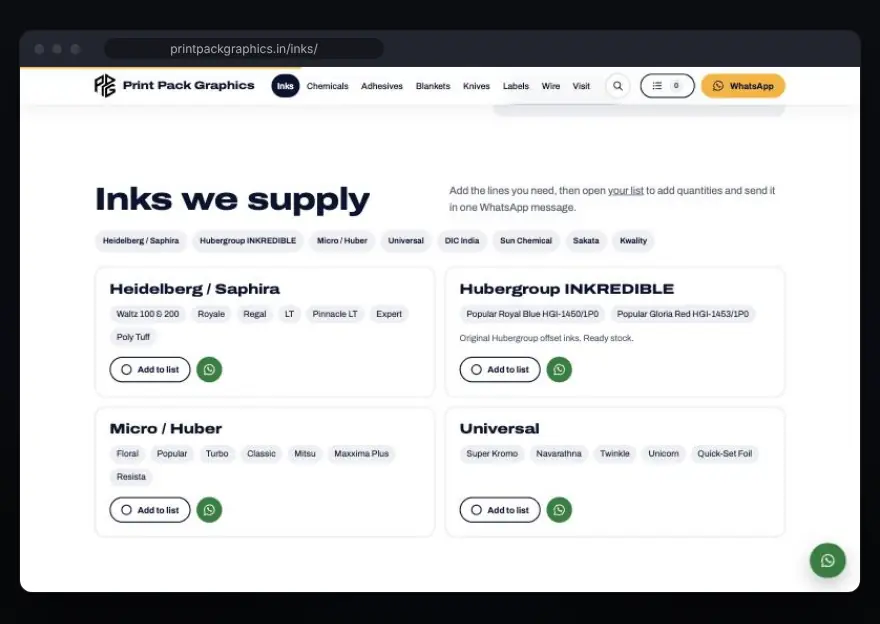
Brand ranges up front. The Inks page groups 41 named inks under eight brand ranges, with the brand names along the top so a buyer can go straight to the range they use.
Search and onward links. Search sits in the header, and every category page links to the other categories, so nobody hits a dead end.
The Inks page: brand ranges along the top, named inks under each, and an Add to list button on every range.
2. Help buyers say exactly what they need
A price can’t be given until the shop knows the shade, the size or the quantity. Instead of leaving that to a back-and-forth, each category page carries a short What to tell us box that lists the details the shop needs for that kind of product.
The site is in English, with key lines also in Tamil, so it reads naturally in both languages.
3. An inquiry list instead of a form
Most supplier sites end in a contact form. For a trade supplier, an order usually starts as a conversation, so the site builds that conversation for the buyer:
Add to list. Every product line has an “Add to list” button, and a counter in the header shows how many items are on the list.
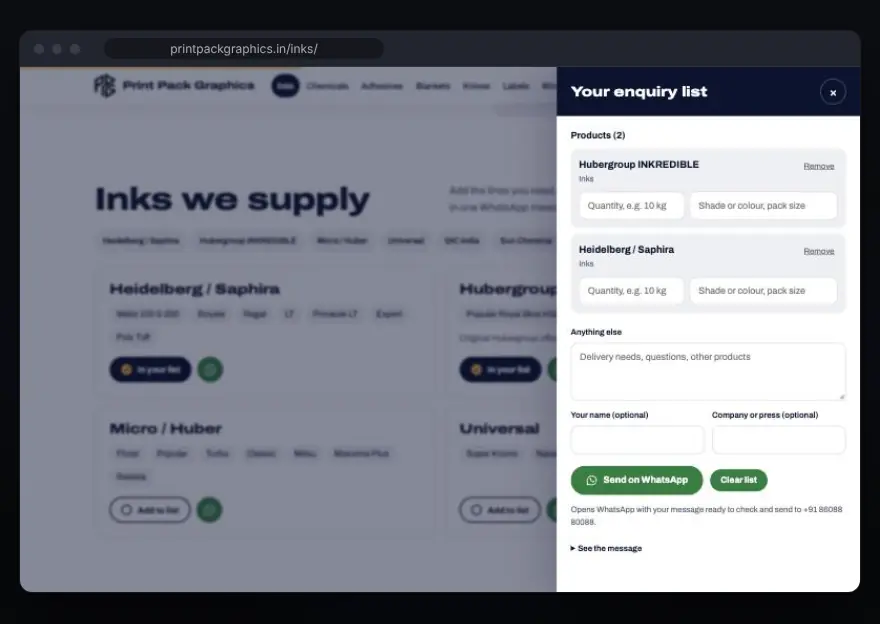
Details per product. The list opens in a side panel where the buyer adds a quantity and the shade or pack size for each item, plus a note for anything else.
Name only if they want. Name and company or press are optional, so a regular customer can order in seconds.
Send on WhatsApp. One button opens WhatsApp with the full message already written, ready to check and send. Buyers can preview the message first.
For a quick single question, each product line also has its own WhatsApp button.
The list panel collects quantities and details for every product, then opens WhatsApp with the message written.
4. Built for the phone, and for callers
The mobile layout gets the same care as the desktop one, and calling is never more than a tap away:
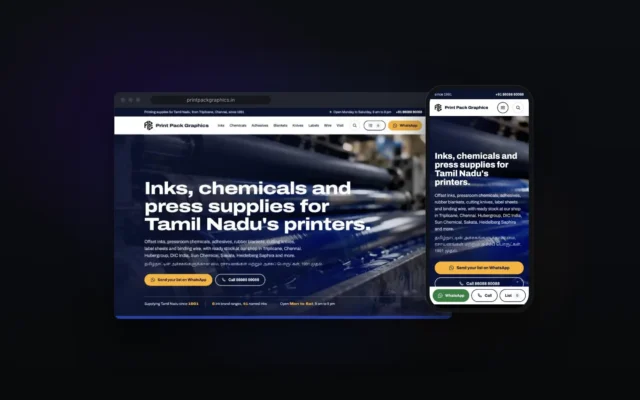
On phones, a bar fixed to the bottom of the screen holds three buttons: WhatsApp, Call and List.
The phone number sits in the top bar, and the opening hours (Monday to Saturday, 9 am to 9 pm) are shown in the header and on the home page.
The home page pairs the main WhatsApp button with a Call button, for buyers who would rather talk.
5. Buyer guides for the questions printers ask
Some questions come up again and again, so the site answers them in a set of buyer guides, each about products the shop sells:
Binding adhesives: hot-melt or water-based glue, and EVA or PUR for perfect binding.
A plain answer helps a buyer order the right thing the first time, and gives search engines and AI assistants a specific page they can show when someone asks the same question.
Lessons for any business supplier
Lead with the range. Visitors should see what you sell before they read about who you are.
Use your customers’ words. Name categories and products the way buyers ask for them.
Tell buyers what you need to quote. A short checklist on each page saves a round of questions.
Let buyers build an order, not fill in a form. A list they can send in one message matches how trade buying really works.
Keep the call and the hours in sight. Some buyers will always prefer to talk.
Answer the repeat questions in writing. A short guide for each common question helps buyers choose and gives search engines something specific to show.
Answer questions round the clock. An AI chatbot can answer stock and product questions and capture inquiries outside shop hours.

 Case Studies